Showing posts with label creativity. Show all posts

Wednesday, January 8, 2020

Everything we need to know about teaching is in an 80s movie

On a Saturday way back in 2014 I was honored to present the keynote address at the Michigan Connected Educators Un/Conference. Here are my thoughts I shared with the group. The message is pretty timeless in the sense that six years later I believe this message even more. I have now updated my original post from what I shared with the conference back in '14. It's all still true today.

I started teaching in January of 1995. Who I thought I needed to be in the classroom was a combination of Michigan's legendary football coach Bo Schembechler and Sgt. Hulka from Stripes...and to some extent it was required. I took over a fourth grade classroom for a retiring teacher who had taken every Monday and Friday off the entire first semester. When I had been there eight days, it was the longest stretch of consistency these kids had had all year.

I had high expectations. I was loud with very low tolerance. I expected my students to be exactly like I had been as a student, compliant. Do what I ask when I ask it with few questions...It wasn’t very fun for any of us. I wondered how I would ever endure 30 more years of this.

In 1998 I faced what I figured would be a “make or break” task. I would be teaching a 5-6 split.  I would have six 6th graders who all were academically gifted in one way or another and seventeen fifth graders who hadn’t been selected for the previous year’s 4-5 split, primarily due to academics. How was I going to tackle this?

What got me through it was the power of using project based learning with the sixth graders....primarily to keep them occupied while I tried to get my 5th graders ready for the state assessment....MEAP test. That approach overtook my teaching that year and by June all kids were working on all kinds of projects and learning together in so many ways. It also became one of my favorite years of my career. You can smile and cheer instead of bark and gripe when your kids are constantly engaged.


That small group of sixth graders always reminded of the kids in My Science Project (watch the whole thing on YouTube) and from there I discovered that everything we need to know about engaging kids can be learned somewhere in an 80s movie.

Lesson 1: What makes tech useful in the classroom. I present to you the ultimate piece of educational technology. Just watch this trailer and think about how this phone booth  from Bill and Ted's Excellent Adventure does exactly what we want our technology to do.  These guys have incredible access to primary sources and get to witness history.  It is total immersion in content. 


If you remember how the film ends, these two put on an amazing rock concert-like oral report. They had the tools to gather information and then presented in a way that expressed the learning through their skills as rock and rollers.

The next lesson is to value the time together. We can not monopolize the time.  Jeff Spicoli actually makes a great point in the following clip from Fast Times at Ridgemont High.  Mr. Hand shouldn’t be the only one having all of the fun...if we can call it that.


There is probably a better way to set up a "feast on our time" though...but to Mr. Hand's credit, he cared enough about Jeff that he even went to Spicoli's house to make sure his surfing student completed enough work to graduate. Time called Mr. Hand the "original No Child Left Behind Teacher".

Image result for weird science

Lesson 3: Kids love to the make stuff but it’s our job though to channel that energy into the right opportunities. Gary and Wyatt learned the hard way about being  responsible with technology. Okay....this 3d printer might trump the phone booth for top tech honors but we are still talking about technology being used educationally!  Weird Science brings one more thought to mind. Did these "two guys" grow up to be Brian Briggs and Ryan O'Donnell, the Bedley Brothers, Brad Waid and Drew Minock, or Kyle Anderson and Joe Marquez?


Somewhat related to #3 is that kids just love to mess with stuff. Even back in 1983 before anyone knew what hacking was, War Games featured some random teens monkeying with North American Aerospace Command (NORAD) and its super sophisticated computer the WOPR. Then in 1986 a kid who looked a lot like the War Games kid was hacking his high school attendance computer so he could go to the museum and a Cubs game. Poor Ferris. He asked for a car and got a computer. Talk about being born under a bad sign. But....he had Internet in 1986. That's not all bad. I wonder if David Jakes ever bumped into Ferris' principal Ed Rooney in any Suburban Chicago educational circles. Rooney could have learned a lot from Jakes. 

#5 is a concept that took me a long time to get my head around. That inconvenient truth is that in the classroom you cannot use the same approach or lesson design for every kid. You have to diversify your instruction according to each kid's needs. No 80's film better exemplifies this than The Breakfast Club. The principal in the film, Mr. Vernon,  required them to each write a 1000 word essay about who they thought they were. Here is the essay Brian ended up writing for all of them.
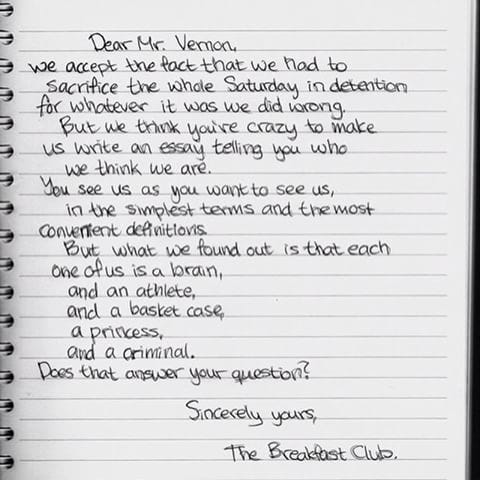
Image result for brian's essay from the breakfast club

He is exactly right. Let us never forget that every student is a complex human being and we need to foster development of their whole being.

Final lesson: It's not about you. It's about creating the right environment where kids can thrive. But, that doesn't mean you still can't be right in the middle of the learning fun. Robin Williams in Dead Poet's Society comes immediately to mind but I also give a big nod  to Bill and Ted's guide Rufus and quite possibly the coolest teacher ever captured n film, Mark Harmon's character Freddy Shoop from Summer School. 

Get in there and dig around with the kids just like Dean Shareski told us at MACUL back in 2014,

"It's not good enough to be the guide on the side anymore. Be the meddler in the middle."

It's been 25 years in the making for me but along the way teaching has become a lot more of an excellent adventure and a lot of a less bogus journey. All I needed to know about teaching is in the movies of the 80's. 

Wednesday, May 2, 2018

Turn Keynote into a 3D Design Studio

With the advent of a growing shape library in Keynote and virtually unlimited fonts (if you use the Mac version), the presentation application can be leveraged into a dynamite design tool...even for 3D printing.

For years I have been using Keynote for just about everything except slide shows. I create fun graphics for video production, t-shirt designs, as it is where I stop long before I fire up Photoshop. Now with a growing assortment of silhouette shapes and symbols, the creativity possibilities have increased exponentially.

Here is a quick workflow for turning Keynote creations on a screen into 3D printed reality.

1. Design in Keynote. Just make everything black so it will convert easily. Here I have designed a shark that will stand up on a small pedestal (to be added later in Tinkercad) with the words "Great White Shark" added to the base. Notice how I added some grass and star fish to liven up the design a bit. I did this one quickly on my iPad so fonts were limited but had I used the Mac version, I could have gotten a lot more in depth with my text designs. Note: Everything you create in Keynote will essentially be one object in the CAD program so it will all print at the same thickness. If you want objects to have differing thickness, just create separate slides for each individual part.


2. Export your slide as an image and then convert to a scalable vector graphic (.svg file). The easiest way I have found to do this to use is SVGcreator.com. It's a simple upload, automatic conversion, and download process.


3. Open your 3D design app or site of choice (I work mainly in Tinkercad.com) and import the .svg file or files you created from the converted slides.

Add any extra pieces you want and then assemble the pieces. I added a wedge piece for the base and then under my text, I slid a small rectangle that will help keep my text together. Eventually I will glue that printed text onto the front of the base.


4. Scale, adjust, and download for printing. Really, that is all there is to harnessing the tremendously creative power of Keynote into something you can actually pick up and handle.

Here is the final product as produced with our XYZPrinting DaVinci Mini Maker. Like most designs, this one too could use some refining. The text ended up being too small to be useful and a little poster putty went a long way to help our shark stay afloat. Still, this is a fun example of what Keynote, creativity and some free conversion tools can help you and your learners create. Think about all of the knowledge they


Friday, March 16, 2018

Unplug and Let 'Em Cut!

Our kids don't get enough practice cutting and pasting. No, not the cheating on a term paper kind of cutting and pasting....real cutting and pasting. Today in Young Fives STEM we just unplugged from iPads and starting cutting the nature magazines provided by a local conservation club...and it was awesome. Beautiful snake collages now decorate numerous refrigerators around Hamilton, Michigan.


Saturday, February 3, 2018

The Chromebook Creativity Project - Jump in.

Since sharing some depressing data on how Chromebooks are being used by over 5,000,000 students in America's schools, great conversations have begun over what do we do about it.

In my post I stated my dismay over the fact no creative sites were listed anywhere in the report. In order to help rectify this, I am beginning this page of links to sites that Chromebook-using learners can use to demonstrate learning in visual ways beyond the traditional typed document.

All of these sites are free and with limited or no apps. Many require no accounts to use and ones that do require accounts often let users use an existing Google Account. Some do have premium features that can be added for a fee.

This is very much an early work in progress and I will be constantly updating with new sites as well as lesson ideas.

Please share additional sites that can be added to this list via this Google Form. The form also gives the option of sharing your own expertise on the app like grade appropriateness, lesson examples of integration, links to student work, and any other insight you would like to share.

Charts and Infographics

ChartBlocks
Datamatic.io
Easel.ly
LucidChart
Photo edited with Lunapic
Piktochart.com
Plot.ly
Venngage
Vizzlo

eBook Publishing

Book Creator App - This one does require some front-loaded setup but is a great tool for students to share learning. Book Creator Ambassador Kelly Croy shares some insight on this episode of this Wired Educator podcast.

Photo Editors and Designers

PhotoRaster
Picozu (Chrome App)
Pixlr.com (Editor and Express) (right click extension)
Ribbet (Chrome App) - Access Google Photos and save back in Google Photos

Animate any portrait with facial expressions at Avatar.Pho.To

Really Fun but still Useful

Photofunia - Small number of image effects may contain weapons of be of a PG nature. 

Friday, February 2, 2018

Yes....and - Alice Keeler continues the Chromebook Crisis conversation

image: AliceKeeler.com
Thanks to educational ball-of-fire extraordinaire Alice Keeler for continuing the conversation after  deemed earlier in the week that we are in a Chromebook crisis.


Original post: An American Chromebook Crisis: new report shows sad trends of how students are using the devices


A new report shows a huge amount of Chromebook use is being spent on educationally questionable video games, low level assessments, and YouTube with the two highest trending websites for over 5,000,000 learners (after G Suite for Education) being CoolMath Games and Renaissance Learning, the parent company to Accelerated Reader and other assessments.

Having followed the great stuff Alice publishes for years, she was actually one of the first people I thought of when I read the study and couldn't wait to hear her reaction. Well, here it is!

Chromebook Crisis: We can and must do better. - AliceKeeler.com


My favorite thing about Alice's post is that it not only expands upon for my call for more students creating with Chromebooks in classrooms, but Alice gives teachers all kinds of suggestions on how to do this with the sites I mentioned in my original post.

And...that's what is so great about the educational technology community. The ideas and plans for doing better are freely available and Alice is one of the best at giving practical, implement-and-make-a-difference-now ideas that don't require huge levels of skill to make work.

Let's do this. We can and must do better.

Wednesday, January 31, 2018

An American Chromebook Crisis: new report shows sad trends of how students are using the devices

A new report is out that tracks how Chromebooks are being used in K-12 classrooms and it is one of the most disheartening things I have read in a long time. I am not lying or using hyperbole. My stomach dropped reading the release from Chromebook management company GoGuardian.

Read the GoGuardian Report here.

In short a huge amount of Chromebook use is being spent on educationally questionable video games, low level assessments, and YouTube with the two highest trending websites for over 5,000,000 learners (after G Suite for Education) being CoolMath Games and Renaissance Learning, the parent company to Accelerated Reader and other assessments.


Let me say it again. The two highest trending websites (after G Suite for Education) for over 5,000,000 learners are

CoolMath Games and
Renaissance Learning, the parent company to Accelerated Reader and other assessments!

Have you ever really visited CoolMath-Games.com? Maybe I am missing something but I struggle to see how most of these games are even math-related, let alone going to build skills? Yes, there is a ton of strategy and logic involved and kids dig the site because they're always asking if they can use it in STEM. Sorry guys, we have a lot more engaging ways to build both math, strategy, and logic.

But...but...it's got Math in the name so it has to be educational, right? I think that alone is a big reason why teachers allow it to get so much traffic...and that kids are quiet for long periods of time while playing on it. Sure, there are worse things they could be accessing, but when this site dominates the study it shows us that the current state of Chromebooks in the classroom is really stuck at the lowest common denominator.

Now, I am not as hugely opposed to Accelerated Reader (Renaissance Learning) as some in the educational technology community are. In the right doses as a SUPPLEMENT to a reading program and used only when students are free to choose their own books I have no problem with it. However when it shows up as the second most trending site in terms of hits and time spent on it, then that shows that far too many schools are making it the core of their reading programs. That could be a whole series of future blog posts. There are other assessments like Star Reading and Star Math that are likely contributing to this number. It would be interesting for GoGuardian to share out that breakdown. Still it's a gut punch to see activities like these taking up such a chunk of how kids are using technology in the classroom.

Okay, first rant over! The study overall is quite interesting and definitely does a thorough job at dissecting where students are spending their time online with Chromebooks.  The 2017 Benchmark Report: An analysis of emerging trends in Chromebook usage looks at what sites are being used most by students in three age brackets as well as what sites are most used by subject area. According to the report, "(The report) gives you an inside look into student device usage to inform best practices and provide a benchmark for your school’s technology programs. The Benchmark Report analyzes the aggregate device usage of 5 million K-12 students across the country."

GSuite for Education is by far the most utilized set of sites by Chromebook users and GoGuardian sets it aside from other non-Google sites, breaking down how the different parts rank. With 62.1% stated as Google Docs, it's my assumption that includes Docs, Sheets, Slides, and Drawings. I would like to see the percentage that each of those is used but the cynic me thinks it is highly likely that a huge chunk of that 62.1% is typing term papers like it's 1985...albeit using a really tricked-out Smith Corona. I do not mean to poo poo the use of Google Docs one bit though. This shows that all of the great aspects like sharing of docs and access anywhere are being used in great doses. Just over a year ago, I chronicled many of the advantages that the free suite offers. It's also important to remember we don't need to live in the "redefinition" realm of the SAMR framework and that technology should support sound pedagogy and Google Docs really can do that.

What surprises me and frankly saddens me a little bit too is that so few of these students' teachers (8%) are using Classroom to manage their Chromebook environments and that Google Drive is only accessed 2.5% of the time.

GoGuardian breaks down how Google's GSuite apps are being utilized in the classroom by 5,000,000 US K-12 users.

Now we get to Rant #2. YouTube grabs almost 21% usage in the Google category. Yes, there are endless numbers of videos that can teach you just about anything. When we cut access to YouTube this Fall at one of my elementary schools due to students being off-task with it, we found out how much we rely on it for independent learning and quickly opened it back up (filtered of course). Still I would love to see a breakdown of the actual types of YouTube videos being watched by students on their Chromebooks. My heart really wants a disproportionate number to be educational but my head leads me to believe that kitty cats, dumb web series, and music videos are probably leading the pack.

To be fair this study is not all doom, gloom, time wasters, and drill and kill. Both Scratch and Code.org popped up numerous times with Scratch garnering a #5 trending overall ranking. It's good to see these computer science sites getting lots of use by Chromebook users. Teachers are also doing their best to gamify a lot of learning as Kahoot came in at the top of a number of categories. Another favorite site of mine that places highly is the set of science simulations from PHET at the University of Colorado. Also, the study opened my eyes to several new sites I hadn't previously visited so definitely spend some time going through the lists.

What bugs me the most (Rant #3): For 23 years I have been evangelizing the use of edtech tools that foster student creativity and I have recently been preoccupied with a suspicion that because fewer and fewer schools are buying Macs for students that ground is likely being lost in the battle to promote high level uses of classroom technology.  When I opened GoGuardian's email with the study all of those fears were validated. I was saddened but not really surprised. Zero sites for creativity are listed in the study. We know fewer kids are getting to create with Keynote, iMovie, and GarageBand due to device choice, but it doesn't look like they're getting many chances to use any of the Chrome-based alternatives to these apps either.

No Soundtrap. No Canva. No WeVideo. No Pixlr. No Emaze.

Creativity is so important and being able to convey a concept in multimedia is a skill all industries are demanding now. A local school board president was asking me about what's next in edtech and the discussion led to content creation. He holds a high-up position with a multi-national company that creates automobile interiors and he agreed.

"Everything, no matter the concept now has to be pitched in a highly visual and easy to understand way. Just using PowerPoint basic slides won't cut it anymore," he shared.

We need to be fostering those skills now.
At least there's Scratch which provides tremendous opportunities for students to develop creativity while building computer science skills. For me its popularity is the brightest spot in this study.
Bottom line: When the technological investment in five million learners is being primarily spent playing games with questionable educational benefit, taking low level assessments, and watching YouTube then we have an edtech crisis on our hands. We can have "certified this" and "distinguished that" honors in our email signatures and be "ambassadors" for a thousand apps and sites but this report shows us the grim reality of how devices are really being used. Many of us have dedicated significant portions our careers to helping our fellow educators use technology in meaningful ways and this report should serve as a wake-up call as there is still a ton of work to do.

We can and must do better.

Updated: ...and the conversations continue. 


Thursday, January 25, 2018

Amaze em with Emaze!

Do you know what's really awesome about having a teenager? No, it's not being encouraged to venture into the world of fancy pocket jeans. Having a personal guide to what's new on Netflix is cool but when it comes to the edtech world, I love when my daughter shows me a new site or app she's using at school.

That's how I discovered Emaze. It's like a mashup of the visual brilliance of Haiku Deck with the functionality of Google Slides all tossed together with the flexibility of Canva. Bottom line: it's a great way for users to create visual content beyond just the slide deck.

If you know me, you know I live by the motto, "if you can't make it in Keynote then you don't need it." In many situations however Keynote isn't always an option or even the best one, like when all kids have access to are Chromebooks. Yes, there's iCloud Keynote but even that can be a challenge with Apple Id's and such. Google Slides is tremendously functional too and I use that a lot. I'm not throwing those out of the digital tool box, I am just excited about what a great compliment emaze is  and that it is intuitive enough for kids in upper elementary to handle.

Here's how you get started.

Logging in is available through existing Google accounts so if your kids already have those, then there is no hassle with having to create a whole set of usernames and passwords. 
Because the site is so visually geared there may be a bit of initial distraction as students find rabbit holes to explore on their first visits. Plan for this ahead and make your introductory session as fun and explore time.
Once you and your kids are ready to get serious about creating content, you will find a variety of support videos for most tasks in Emaze. There is also a ton of inspiration within emaze as the site is full of shared work and templates. So, go check out what you can do. You'll be e-mazed!


Thursday, April 24, 2014

Explore The World Of Chromville In Augmented Reality


The developers at Spain's Chromville are busily creating an augmented reality world for users of all ages. By printing and then coloring pages depicting different characters and parts of the Chromville world, "explorers" use the special app available in Android and iOS to make their scenes come to life.


Here is the backstory on this mystical land according to Chromville.com.

"The ancient world Chromville, is well known for its power source of color. It´s placed in a galaxy far, far away and there are at least five villages: Firecity, Stonetown, Greenland, Waterville and Cloudskingdom. Its inhabitants, the Chromers, look like their environment and live in peace thanks to the colorful beauty of their homeland. However, the planet´s color is fading away mysteriously in some regions and they are in danger of losing its power.

Your quest is to help Chromers to discover the enigma and solve the color problem of their planet. Paint and play with your friends and family to discover all the interactive mysteries of this adventure."

The app is still in beta but performance is consistent enough to start using it with students. Chromville is planning on expanding quickly and is currently (April 2014) running a writing contest so students can play a role in developing the narrativesoccurring in the different villages.

As a teacher, my favorite aspect is the open-endedness of the site. The app and coloring pages help bring characters to life...but who these characters are and what makes them special is only limited by the user's imagination.

Hands-down though my favorite feature is the blank character maker. I may...or may not have created my own Mr. T in Chromville. All I can say is, "I pity the fool who doesn't give this site and app a spin."

This instructional video shows how to get started.


Monday, April 21, 2014

Going Big - Caine's Arcade Style

[caption id="attachment_532" align="alignleft" width="225"]Willis Tower, Caine's Arcade Style Willis Tower, Caine's Arcade Style[/caption]

Inspired by all of the creativity and ingenuity involved in the building of Caine's Arcade, I took our annual research of the World's tallest skyscrapers into the cardboard construction world.

This project with third graders took on many layers.
-Learning to research, looking

[caption id="attachment_545" align="alignleft" width="225"]One World Trade Center Freedom Tower One World Trade Center Freedom Tower[/caption]

for specific facts
-Manipulating and studying models in Sketchup
-Understanding and calculating scale, 200 feet in real life equaled one foot of cardboard
-Engineering of a free-standing structure
-Creativity and style
-Developing perseverance and stamina when the best laid plans fall flat, literally

Some projects came together much better than others. We are dedicating one final class period to our architecture next week. At that time, we will sit down and take a hard look at what went well and what did not go well. Not all buildings are are going to stand as well as this version of the Willis Tower in Chicago. The biggest challenge will be for the kids to tell me why their building experience went well or what could have gone better. They are just third graders. If we don't give them the chance to try projects like this and experience the trials and tribulations of collaboration then we can't expect it just to naturally happen.

Wednesday, October 16, 2013

Six Pins for fostering creativity

[caption id="attachment_312" align="aligncenter" width="300"]Screen Shot 2013-10-16 at 12.47.20 PM Six pins of projects I have used to foster creativity[/caption]

Adobe launched its Creativity in Education sweepstakes today. To enter all you have to do is follow Adobe's Education account and then pin six or fewer examples on your own "Creativity in Education" board of how you are fostering creativity in your classroom or school.

Check out the six  pins I just entered.

Thursday, January 24, 2013

Hamilton PD Day 1/25: "Creativity in Hand" Session Resources

[caption id="attachment_145" align="alignleft" width="262"] Great image created by Jacque Drenten using Frames Artist app. [/caption]Here are session resources for my Hamilton PD iPad session "Creativity in Hand".


Video Production

Shooting Gallery Guide


Minarets Shooting Gallery Level One from Minarets High School

Vimeo app • Andy's Vimeo Page

Action Movie Producer


[caption id="" align="alignleft" width="153"] Arrange your photos with the Frames Artist app[/caption]


Photo Projects

Doodle Buddy
PS Express
Color Effects
Pixlr-o-matic
Pixlr Express
Hipstamatic
Instagram
Frames Artist
Popplet Lite

Other Fun Ones
PegLight 2
Vintagio (Silent Film App)
Pottery HD Lite

Tuesday, November 20, 2012

Wow! That's just about all I can say about these book report trailers.

Sometimes you get an idea and it seems like it might be pretty cool.

I really liked what my Apple Distinguished Educator buddy Sean Junkins had created when he used Discovery Education footage to make historic movie trailers.

Since we don't have access to Discovery Education anymore, I was perplexed how I could do something similar with our kids. Coincidentally at about the same time I was thinking how kids still need chances to do old fashion arts and crafts and little skits. Somehow this project ended up lending itself to the best of both worlds. They would use the Apple iMovie app's trailer building capabilities but would have to get really creative on how they would produce the footage. It was completely open-ended but after a week of brainstorming we had really focus on the project being do-able.

The other guidelines were:
A) Trailers had to provide important information about the plot or focus on character traits.
B) Trailers could not be "spoilers" for anyone who had not yet read them.
C) Trailers had to be non-violent.
D) Several students could work together and there was no limit on the number of projects in which students could participate. Students could work solo but all students had to be included in meaningful ways.
E) This was basically an introduction/exploration activity and I didn't fully know what we would accomplish so there wasn't a set evaluation rubric beyond my formative checkups along the way.

The results were mind-blowing. Here is one on the Hunger Games Trilogy's Mocking Jay. More can be found in the project's album on Vimeo.


My biggest reflection on this project is that you never know how a project might go. Sometimes they flop but as long as you salvage the key points, that is okay. Sometimes you get way more than you ever expect. Also, don't think this is rocket science and beyond your capabilities. I completely left completion of it up to the kids (with some progress monitoring and coaching along the way) but it was them who knocked this thing out of the park.